Monday, 21 December 2015

Oracle SOA 12.2.1 Installation - Create Service Bus Domain using WLST Script

Oracle SOA 12.2.1 Installation provide sample wlst script to create Service bus Domain.

The script is available in below location

%MW_HOME%\osb\common\wlst\create_samples_domain.py


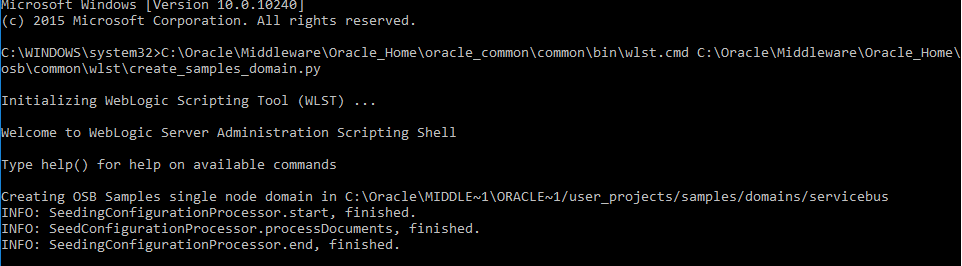
To create the domain, open the cmd prompt as Admin, run the below command

C:\Oracle\Middleware\Oracle_Home\oracle_common\common\bin\wlst.cmd %MW_HOME%\osb\common\wlst\create_samples_domain.py


Note: All the configurations (Domain Name,Listening port, Password etc) are preloaded in the create_samples_domain.py script. If require, you can modify the script with your configurtion.

Default Settings
-------------------
Domain: ServiceBusSamples
port:        7021
domain location: C:\Oracle\Middleware\Oracle_Home\user_projects\samples\domains\servicebus

To start the server, go to the domain location and run the startWeblogic.bat script.


 The Domain is pre-loaded with sample OSB Project.
You can test the sample from below url

http://localhost:7021/examplesWebApp/index.jsp


Next, i will be posting Oracle SOA 12.2.1 installation and configuring standalone server


Friday, 1 May 2015

Find and Replace JCA properties for Service Bus 12C / OSB 11G using Maven


We can create and edit a customization file in which we can only replace Proxy Service/Business Service artifacts and some JCA properties like JCA Always Use JCA File Flag, JCA Connection Mode.


But in real time scenarios, we are required to modify JCA properties such as PhysicalDirectory/LogicalDirectory/JNDI Location which is not possible using OSB customization file


Using "maven-replacer-plugin:replacer" we can build plugin to replace tokens within a file with a given value and fully supports regular expressions.

Plugin artifactId was renamed to "replacer" from "maven-replacer-plugin" due to a naming policy change from the Maven team.

This plugin is typically used to change configuration within a project during a maven build. It also can perform some advanced text replacement functions, such as providing a separate token/value file to keep your build script concise, writing resulting text after replacement to a separate file and token matching with regular expressions. There is even support for making exact document node replacements via X-Path. 

Simple example usage:
<build>
   
<plugins>
        ...
       
<plugin>
           
<groupId>com.google.code.maven-replacer-plugin</groupId>
           
<artifactId>replacer</artifactId>
           
<version>1.5.3</version>
           
<executions>
               
<execution>
                   
<phase>prepare-package</phase>
                   
<goals>
                       
<goal>replace</goal>
                   
</goals>                  
               
</execution>
           
</executions>
           
<configuration>
               
<file>target/${project.artifactId}/somefile.txt</file>
               
<replacements>
                   
<replacement>
                       
<token>SOME TOKEN</token>
                       
<value>SOME VALUE</value>
                   
</replacement>        
               
</replacements>
           
</configuration>
       
</plugin>
   
</plugins>
</build>

I have create a sample Service Bus Project FileDebatching which will read the file in chunks from a location (will configure using JCA FileAdapter ) and writes into another location


For the Read File, I have the Physical Directory location as C:\TestFiles\ChunkFile\FileChunck\INPUT


Now, I will deploy the composite using Maven. Below are the plugin properties available in project pom.xml.

JCA File Properties in Service Bus Console after the deployment


Now using maven-replacer-plugin:replacer plugin we will replace the PhysicalDirectory location.

Go into the Project pom.xml then add the replacer plugin with the file name and token which is to be replaced.
I have fileService_file.jca file inside Resources location


Below is pom.xml plugin details added with replacer token

<file>Resources/fileService_file.jca</file>
          <replacements>
            <replacement>
              <token>C:\\TestFiles\\ChunkFile\\FileChunck\\INPUT</token>
              <value>C:\\TestFiles\\ChunkFile\\FileChunck\\IN</value>
            </replacement>


Redeploy the Service again

Now in Service bus Console


Note: The Replacer will replace the token in fileService_file.jca file and then deploy the service, so the file is modified with the new token.


Saturday, 9 November 2013

OSB : Polling Proxy Service Fires Twice on Error

SYMPTOMS

Consider the example of a file proxy (file transport) but issue is presumably similar for all polling proxies.
Customer had a file proxy set up to poll for certain files. In the pipeline of the proxy, another proxy service is invoked to check the format of the incoming file. This is done within a transaction. If the file is good, execution completes as expected. If the file is deemed bad, an error is raised. The file proxy executes twice every time an exception is raised, causing undesirable twofold compensatory actions.

CAUSE

The polling is done by an MDB (PolledMessageListenerMDBEJB - see "File Transport Provider" under deployments) listening to a dedicated queue, which in the case of the file transport is called:
wlsb.internal.transport.task.queue.file

and lives in the JMS module called: "jmsResources".

This queue has a "Redelivery Limit" parameter (see under "Delivery Failure" tab) which is set to 1 by default .

SOLUTION

If you set this Redelivery Limit to zero, the proxy will always execute once, regardless of whether an exception is raised in the pipeline or not.

Polling proxies in OSB and Event Generators in WLI in most cases are implemented through this kind of architecture, i.e. a message with delayed delivery is put on a dedicated JMS queue. After the allotted polling interval, the message fires an MDB belonging to proxy and a new delayed delivery message is placed on the queue to fire the next polling action. Similar queues for other transports in OSB are:
wlsb.internal.transport.task.queue.email
wlsb.internal.transport.task.queue.ftp
wlsb.internal.transport.task.queue.sftp

Friday, 25 October 2013

Handling Large Messages with Content Streaming in OSB

Handling Large Messages with Content Streaming

OSB supports the streaming of content through the service bus and also supports streaming transformations. Content streaming is enabled by simply selecting the Enabled check box during proxy service definition


The following are some of the best practices related to streaming content:

Enable streaming for pure content-based routing scenarios. Read-only scenarios such as content-based routing can gain significantly from enabling streaming. OSB leverages the partial parsing capabilities of the XQuery engine when streaming is used in conjunction with indexed XPaths. Thus, the payload is parsed and processed only to the field referred to in the XPath. Other than partial parsing, an additional benefit for read-only scenarios is that streaming eliminates the overhead associated with parsing and serialization of XMLBeans.

Enable streaming if there is an out-of-memory error when transforming large messages.
The output of a transformation is stored in a compressed buffer format either in memory or on disk. Using a compressed buffer format has a significant CPU penalty. Hence, when running out of memory is not a concern, streaming with compressed buffering should beavoided.

Use a hybrid approach for multiple reads with streaming.
The gains from streaming can be negated if the payload is accessed a large number of times for reading multiple fields. If all fields read are located in a single subsection of the XML document, a hybrid approach provides the best performance. The hybrid approach includes enabling streaming at the proxy level and assigning the relevant subsection to a context variable
For example, the fields Total and Status from the Below XML can be retrieved from a fully materialized subsection Summary:

****************************************************************
<soap-env:Body>
    <Order>
<CtrlArea>
<CustName>Mary</CustName>
</CtrlArea>
<ItemList>
<Item name="ACE_Car" >20000 </Item>
<Item name=" Ext_Warranty" >1500</Item>
.... a large number of items
</ItemList>
<Summary>
<Total>70000</Total>
<Status>Shipped</Status>
<Shipping>My Shipping Firm </Shipping>
</Summary>
</Order>
</soap-env:Body>
****************************************************************
Assign "$body/Order[1]/Summary[1]" to "summary"
Assign "$summary/Total" to "total"
Assign "$summary /Status" to "status"

Monday, 7 October 2013

Grouping Distinct Value nodes using Xquery and XSLT

Below sample explains to get distinct nodes from any xml and returning nodes for the same group node.

Let say the input has below xml where for multiple <person> node, you need to group <mail> nodes for the same <age> node

I/P
<persons>
 <person>
  <name>Tom</name>
  <age>20</age>
  <mail>abc@test.com</mail>
 </person>
 <person>
  <name>Tom</name>
  <age>10</age>
  <mail>pqr@test.com</mail>
 </person>
 <person>
  <name>Tom</name>
  <age>20</age>
  <mail>xyz@test.com</mail>
 </person>
</persons>

O/P
<persons>
 <person>
  <name>Tom</name>
  <age>20</age>
  <mails>
   <mail>abc@test.com</mail>
   <mail>pqr@test.com</mail>   <mail>xyz@test.com</mail>  </mails>
 </person>
</persons>

Below is the XQUERY solution to generates the above output

O/P
(:: pragma bea:global-element-parameter parameter="$groupSetup1" element="ns1:persons" location="../XSD/Inp.xsd" ::)
(:: pragma bea:global-element-return element="ns0:persons" location="../XSD/Out.xsd" ::)

declare namespace ns1 = "http://www.input.org";
declare namespace ns0 = "http://www.output.org";
declare namespace xf = "http://tempuri.org/Outbound820/Transformations/GroupTransform/";

declare function xf:GroupTransform($groupSetup1 as element(ns1:persons))
    as element(ns0:persons) {
        <ns0:persons>
            <ns0:person>
                {
                    
                    for $g in fn:distinct-values($groupSetup1/ns1:persons/ns1:age)
                    return
                            <ns0:age>{ $g }</ns0:age>
                            <ns0:mails>
                                {
                                for $grpset in $groupSetup1/ns1:persons
                                where $grpset[ns1:age eq $g]/ns1:mail/text() != ''
                                return
                                <ns0:mail>{ data($grpset[ns1:age eq $g]/ns1:mail/text()) }</ns0:mail>
                                }
                            </ns0:mails>
                        
                }
            </ns0:person>
        </ns0:persons>
};

declare variable $groupSetup1 as element(ns1:persons) external;

xf:GroupTransform($groupSetup1)


Grouping XML elements using XSLT - xsl:for-each-group
This is an informal post on XSLT for-each-group which is very powerful function to group xml elements based on some criteria.

For Ex, you may want to convert a flat structure, typically returned by DB into an xml which is, say department wise. for-each-group is what you want

This sample is to convert a flat structure into a projectOwner wise grouping

Input

<MailPayload>                              
    <ActivityPayload>                              
        <ActivityId>101</ActivityId>      
        <ActivityName>T1</ActivityName>      
        <ActivityOwner>Act1Owner</ActivityOwner>      
        <ProjectId>1001</ProjectId>          
        <ProjectName>Prj1</ProjectName>      
        <ProjectOwner>PrjOwner</ProjectOwner>      
        <ApprovalStatus>some desc 1</ApprovalStatus>
        <Comments>comments1</Comments>
    </ActivityPayload>                              
    <ActivityPayload>                              
        <ActivityId>102</ActivityId>      
        <ActivityName>T2</ActivityName>      
        <ActivityOwner>Act2Owner</ActivityOwner>      
        <ProjectId>1002</ProjectId>          
        <ProjectName>Prj2</ProjectName>      
        <ProjectOwner>PrjOwner</ProjectOwner>      
        <ApprovalStatus>some desc 2</ApprovalStatus>
        <Comments>comments2</Comments>
    </ActivityPayload>                              
</MailPayload>

Ouput Format required

<?xml version="1.0" encoding="UTF-8"?>
<MailPayload>
<ProjectOwnerWise>
<ProjectOwner>PrjOwner</ProjectOwner>
<Activities>
<IndActivity>
<ActivityId>101</ActivityId>
<ActivityName>T1</ActivityName>
<ProjectId>1001</ProjectId>
<ProjectName>Prj1</ProjectName>
<Comments>comments1</Comments>
</IndActivity>
<IndActivity>
<ActivityId>102</ActivityId>
<ActivityName>T2</ActivityName>
<ProjectId>1002</ProjectId>
<ProjectName>Prj2</ProjectName>
<Comments>comments2</Comments>
</IndActivity>
</Activities>
</ProjectOwnerWise>
<ProjectOwnerWise>
<ProjectOwner>PrjOwner2</ProjectOwner>
<Activities>
<IndActivity>
<ActivityId>103</ActivityId>
<ActivityName>T3</ActivityName>
<ProjectId>1002</ProjectId>
<ProjectName>Prj3</ProjectName>
<Comments>comments2</Comments>
</IndActivity>
</Activities>
</ProjectOwnerWise>
</MailPayload>

XSLT
-------

<?xml version="1.0"?>
<xsl:stylesheet version="2.0" xmlns:xsl="http://www.w3.org/1999/XSL/Transform">
  <xsl:template match="/">
   <MailPayload>
<xsl:for-each-group select="/MailPayload/ActivityPayload" group-by="ProjectOwner">
    <ProjectOwnerWise>
<ProjectOwner>
  <xsl:value-of select="current-grouping-key()"/>
</ProjectOwner>
<Activities>
  <xsl:for-each select="current-group()">
   <IndActivity>
<xsl:copy-of select="ActivityId|ActivityName|ProjectId|ProjectName|ReviewerDecision|Comments"/>
   </IndActivity>
  </xsl:for-each>
</Activities>
</ProjectOwnerWise>
</xsl:for-each-group>
   </MailPayload>
  </xsl:template>
</xsl:stylesheet>

for-each-group groups the entire xml as per the group-by value defined and loads in memory
ex : <xsl:for-each-group select="/MailPayload/ActivityPayload" group-by="ProjectOwner">  -- ProjectOwner here

current-grouping-key() gives the values of all ProjectOwner
current-group() lists all the tags defined in a particular set